
BcStep TM Task Management

Task Management, Connected to Execution

Traditional task managers mainly tell you what tasks exist and whether they are complete.

BcStep Task Manager goes further. It connects project workflows, communication, people, documents and task execution into one structured system.

A requirement can originate from predefined BcStep TM task-lists, ProChat or ProCom, become a task, move through a defined execution sequence, and remain connected to its supporting communication and documents until logical closure.

Connected Execution:

Task Management Communication Project Data People Documents Execution

Task Lists

Start with activity-based Master Task-List Templates instead of creating every task list from scratch.

Task Lists

Predefined Task Lists

ProChat

Convert requirements from business conversations directly into actionable tasks.

Communication

ProChat

ProCom

Convert formal business communication and decisions into structured tasks.

Formal Communication

ProCom

Project Data

Connect every task with the project data needed for informed execution.

Project Data

Project Data

Documents

Keep supporting documents connected to the task throughout its execution.

Documents

Supporting Documents

Execution

Move tasks from planning and communication into controlled project execution.

Execution

Task Execution

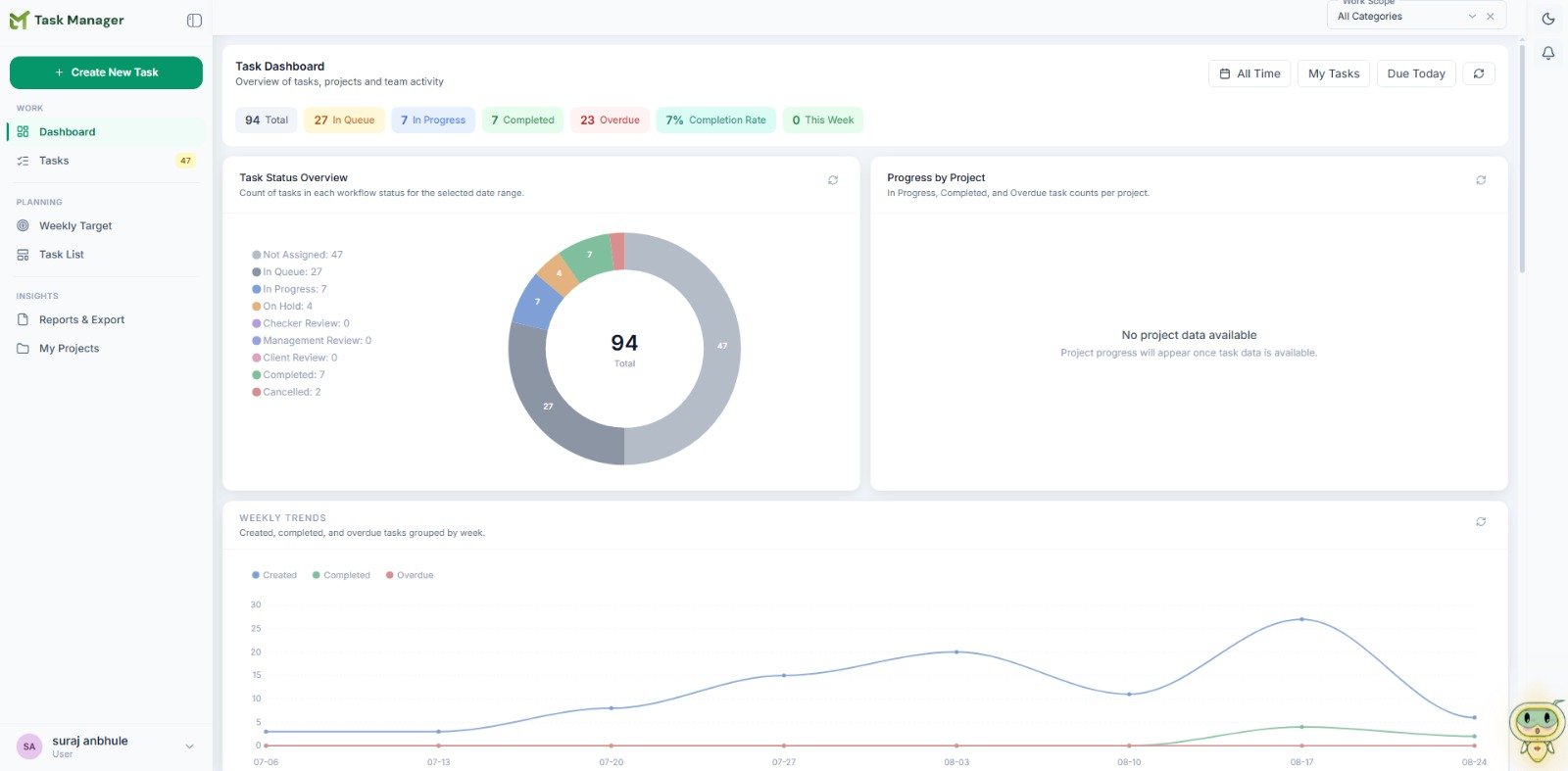
BcStep Task Manager Dashboard
MASTER TASK-LISTS

From Predefined Workflows to Project-Specific Task-Lists

Never Start a Project's Task-List From Scratch

Construction activities follow repeatable processes, but every project has its own requirements.

BcStep TM provides predefined activity-wise Master Task-List Templates that can be adapted into project-specific task lists. These templates can include recurring tasks and structured activity sequences.

Each master task-list structure can follow one of the following three workflow patterns:
i

Collection → Filing

These task-lists cover activities and tasks where your organization collects required documents from other organizations and stores them at its server for future reference by its team members, without further processing or modification.

Collection Filing

ii

Collection → Review & Commenting → Updated Document Collection → Filing

These task-lists cover activities and tasks where your organization collects documents from other organizations, reviews and comments on them internally, shares the required comments or inputs with the designated organization or stakeholder, receives the updated documents, and finally files them at its server for future reference.

Collection Review & Commenting Updated Document Collection Filing
iii

Creation of Source Documents → Handoff

These task-lists cover activities and tasks where your organization creates and prepares source documents required for the project and then hands them over to other organizations or stakeholders for their subsequent action or processing.

Creation of Source Documents Handoff

When project teams prepare project-specific task-lists using Senior Management-approved Master Task-Lists, they can follow the organization's established and standardized workflows across different activities, while retaining the flexibility required by each project.

This also reduces dependency on individual employees for explaining how activities and their associated tasks are to be executed. Even when employees change or new team members join a project, the predefined workflow provides a clear understanding of what needs to be done, in what sequence, and how the activity should progress—reducing the need for repeated training on the organization's established execution processes.

Master Workflow
Project Task List
Execution
Master Workflow → Project Task List → Execution

The system also maintains the history of tasks added during project-specific task-list preparation, helping management identify where Master Task-List Templates may need improvement and continuously strengthen the organization's workflows.

TASK ORIGIN

Tasks That Come From Where
Work Actually Happens

A Task Should Never Be Lost Because It Started Somewhere Else

In real projects, requirements do not originate only from a predefined task-list.

They can emerge through:
PC
ProChat Requirement
PC
ProCom Requirement
BCSTEP TASK MANAGER

Requirement → Task

BcStep Task Manager allows these requirements to be converted into tasks along with their full context and attached files, without manually recreating the information.

01 Full Context
02 Attached Files
03 Task
WHAT THIS REDUCES

Manual recreation disappears from the workflow.

01 Missed tasks
02 Duplicate task entry
03 Loss of communication context
04 Manual copying
05 Missing supporting documents
Communication Creates the Task. The Context Travels With It.
Every Task Has a Structured Team and the Right Control

Maker. Checker. Planner & Coordinator.

BcStep TM separates task execution, validation and monitoring through defined roles:

01
M

Maker

Responsible for executing the task.

02
C

Checker

Responsible for validation and final task status.

03
PC

Planner & Coordinator (PC)

Responsible for monitoring task progress and coordination.

ROLE-BASED CONTROL

The system provides role-based control over these assignments while retaining practical flexibility for project execution.

A Maker and Checker can be the same person, where appropriate.

However, a person assigned as Maker or Checker cannot simultaneously act as the Planner & Coordinator (PC) for that task.

PC
Maker Checker Senior Management
ASSIGNMENT CONTROL

Once a person is assigned as the Planner & Coordinator and assigns another person as the Checker, they cannot decide who will be the Maker.

The Maker can be assigned or changed only by the Checker or by Senior Management—Founders, Partners, Key Managers or HR/Accounts Heads.

The Right Person. The Right Responsibility. The Right Control.
Controlled Task Lifecycle — Keeping Tasks Visible Until Closure

Once a Task Exists, It Doesn't Simply Disappear

BcStep TM is designed around continuous task visibility.

01 TASK ORIGIN

Tasks can originate from:

Approved Project-Specific Task-Lists
or
02 TASK ORIGIN


Direct Management Assignment (from ProChat, ProCom or BcStep TM)

and remain traceable throughout their lifecycle.

Continuous
Task Visibility
Management View

Once a task appears in an approved project-specific task-list, it cannot be deleted by employees. Deletion is restricted to Senior Management—Founders, Partners, Key Managers or HR/Accounts Heads.

In Queue
In Progress
Overdue
Completed

Employees can only Complete, Cancel or Hold the task, as applicable. However, even when a task is cancelled, put on hold or completed, its presence and status within the predefined project task-list remain visible to management. This ensures that no task added to an approved project workflow can simply disappear from management's view.

01

Senior Management Visibility

This also gives Senior Management an immediate overview of the project's workflow status simply by reviewing the project-specific task-list, without having to ask team members for separate status reports.

02

Project Handover

It also makes project handover significantly easier when an existing employee leaves or a new member is assigned to the project. The incoming team member can review the task list, understand the current status of every activity and what remains to be executed, without depending on someone to prepare and explain a separate status report.

MANAGEMENT-ASSIGNED TASK

Similarly, a task assigned by Senior Management through ProChat or ProCom communication, or directly created in BcStep Task Manager as a “New Task,” cannot be cancelled or deleted without the required approval of the person who assigned the task. This ensures that management-assigned tasks remain accountable until they are properly completed or otherwise closed with the required authorization.

MANAGEMENT VIEW

This gives management continuous visibility into:

In Queue
In Progress
Overdue
Completed
Every Important Task Remains Visible Until Proper Closure.
Tasks can also originate from:

Direct Task Creation

(Task Created by Maker, Checker or PC)

M Maker
C Checker
PC Planner & Coordinator
NEW TASK Task Created for Execution

Tasks do not always have to be created by Senior Management. A Maker, Checker or Planner & Coordinator (PC) can also create a task directly for execution.

However, creating a task does not give the creator unrestricted control over its lifecycle.

CONTROL BOUNDARY

Task Lifecycle Control

Maker Creates / Executes
Checker Controls task actions
Senior Management Required authority

If the Maker and Checker are different people, the Maker cannot independently Delete, Cancel, Hold or Complete the task. Such actions can be taken only by the Checker or Senior Management—Founders, Partners, Key Managers or HR/Accounts Heads.

This ensures that a task created directly by a Maker, Checker or PC also cannot simply disappear from the execution list without the knowledge and control of the appropriate authority.

Every Task Created for Execution Remains Accountable.

Every Task Carries Its Own
Context

Task + Communication + Documents + Decisions

T
Task Context

Every task has a dedicated, structured communication environment—a dedicated Chat thread, where team members involved in the task can share and discuss matters at each stage of its execution, including:

01

Supporting documents

02

Relevant project information

03

Execution discussions

04

Decisions

05

Updates

The task therefore retains the context required to understand what needs to be done, why it needs to be done, what was decided, and who was involved.

Why it matters

The Task Doesn't Just Tell You What To
Do. It Tells You Why.

This becomes particularly valuable when tasks continue over long periods or when team members change, as the complete task-related communication and context remain available with the task rather than depending on an individual to explain what happened earlier.

Project Workflow Visibility for Management & New Joiners

See More Than Completed vs. Pending

Project Workflow
Task Status
!
Pending / Overdue / Incomplete Tasks
Execution Sequence
Project Workflow Progress

Approved project-specific task-lists allow senior management to monitor:

01 Task Status
02 Pending / Overdue / Incomplete Tasks
03 Execution Sequence
04 Project Workflow Progress

This allows management to identify tasks that are being overdue, bypassed or executed out of sequence.

Because tasks from approved workflows cannot simply disappear without visibility, management retains stronger control of project execution.

The same structured workflow also makes project handover significantly easier. When a new employee takes over a project, they do not need to depend on someone to explain the project's current status or prepare a separate status report.

The defined workflow patterns and project-specific task-list themselves provide the context. By reviewing the tasks, their sequence and their current statuses, the new team member can quickly understand:

Project Context
01 What has been completed
02 What is currently in progress
03 What is pending or overdue
04 What needs to happen next

This provides a new team member with an immediate understanding of the project's workflow status, even when the previous employee is no longer available to explain the work or provide a handover.

Management Sees the Project Workflow—Not Just the Task List.

Weekly Targets & Performance Tracking

Measure Commitments, Not Just Completions

01

BcStep TM allows Makers to define Weekly Targets based on their actual capacity and commit to completing tasks within a defined period.

Committed Tasks
VS
Completed Tasks

The system can compare:

Committed Tasks vs Completed Tasks

This provides measurable insights into:

01 Individual performance
02 Reliability
03 Workload
04 Planning capability
05 Execution consistency

It can also support better organizational forecasting and more reliable commitments to clients.

More importantly, BcStep TM provides visibility into how consistently a person takes responsibility for tasks and actually executes them.

If a Maker, Checker or PC repeatedly takes a large number of tasks into their weekly targets but consistently fails to execute them, the system can show the same tasks continuing to appear in their weekly targets over multiple weeks.

Week 01
Task A
Task B
Week 02
Task A
Task B
Week 03
Task A
Task B

Management can therefore identify tasks that have remained in an individual's workload for an extended period without meaningful progress.

This helps distinguish between genuine workload and apparent workload, giving management a clearer picture of whether someone is actually taking on and completing substantial work or repeatedly committing to tasks without execution.

Genuine workload
VS
Apparent workload
!

It becomes much harder to create a misleading impression of performance simply by continuously taking tasks into weekly targets without actually completing them.

Know What Was Done—and What Was Committed.

This creates a much more meaningful performance picture than simply counting completed tasks.

Task Management That
Becomes a Learning System

Every Project Can Improve the Next One

01

Well-prepared Master Task-Lists do more than ensure execution.

02

They can also act as workflow-learning and training tools, helping less-experienced team members understand how project activities should be performed without repeatedly depending on senior personnel for guidance.

03

The history of tasks added during project-specific task-list preparation can also help management identify gaps in the Master Task-Lists and continuously improve future workflows.

Master
Task-Lists
Project
Learning
Future
Workflows
PROJECT IMPROVEMENT
Every Project Can Make the Next Project Smarter.

The BcStep Task Manager Advantage

01

Connected Task Creation

Create tasks directly from ProChat and ProCom.

02

Structured Workflows

Start from activity-based Master Task-List Templates rather than creating every task list from scratch.

03

Role-Based Execution

Clearly define Maker, Checker and Planner & Coordinator responsibilities.

04

Controlled Task Lifecycle

Keep important tasks visible, traceable and management-controlled until proper completion or authorized closure.

05

Task-Based Communication

Keep discussions, documents, decisions and supporting information connected to the task.

06

Real-Time Coordination

Automatically update relevant stakeholders as task status changes.

07

Project Workflow Visibility

Monitor task sequence, pending work, overdue and incomplete activities.

08

Performance Tracking

Compare committed vs completed tasks to understand performance and reliability.

09

Recurring Task Management

Support recurring activities within structured task-lists for continued workflow execution.

10

Workflow Learning

Use structured task-lists as a training and workflow-learning tool for teams.

Business User
Business User

Ready To Run Your Entire Business From One Platform?

Request A Demo