
ProCom Formal Communication

Formal Communication, Structured Around Projects

Traditional email was designed primarily to send and receive messages. ProCom is designed for project-driven business communication.

Every communication is linked to a specific project, with predefined or prepped subject categories aligned with common communication types. This makes communication easier to identify, retrieve and trace later.

ProCom transforms:

Email Project Subject Communication Decision Action

Email

Send and receive messages structured around your projects.

Email

Project

Every communication is linked to a specific project.

Project

Subject

Predefined subject categories aligned with common communication types.

Subject

Communication

Identify, retrieve and trace every conversation with ease.

Communication

Decision

Capture formal decisions linked to the right project context.

Decision

Action

Track follow-up actions tied directly to each communication.

Action

click to preview

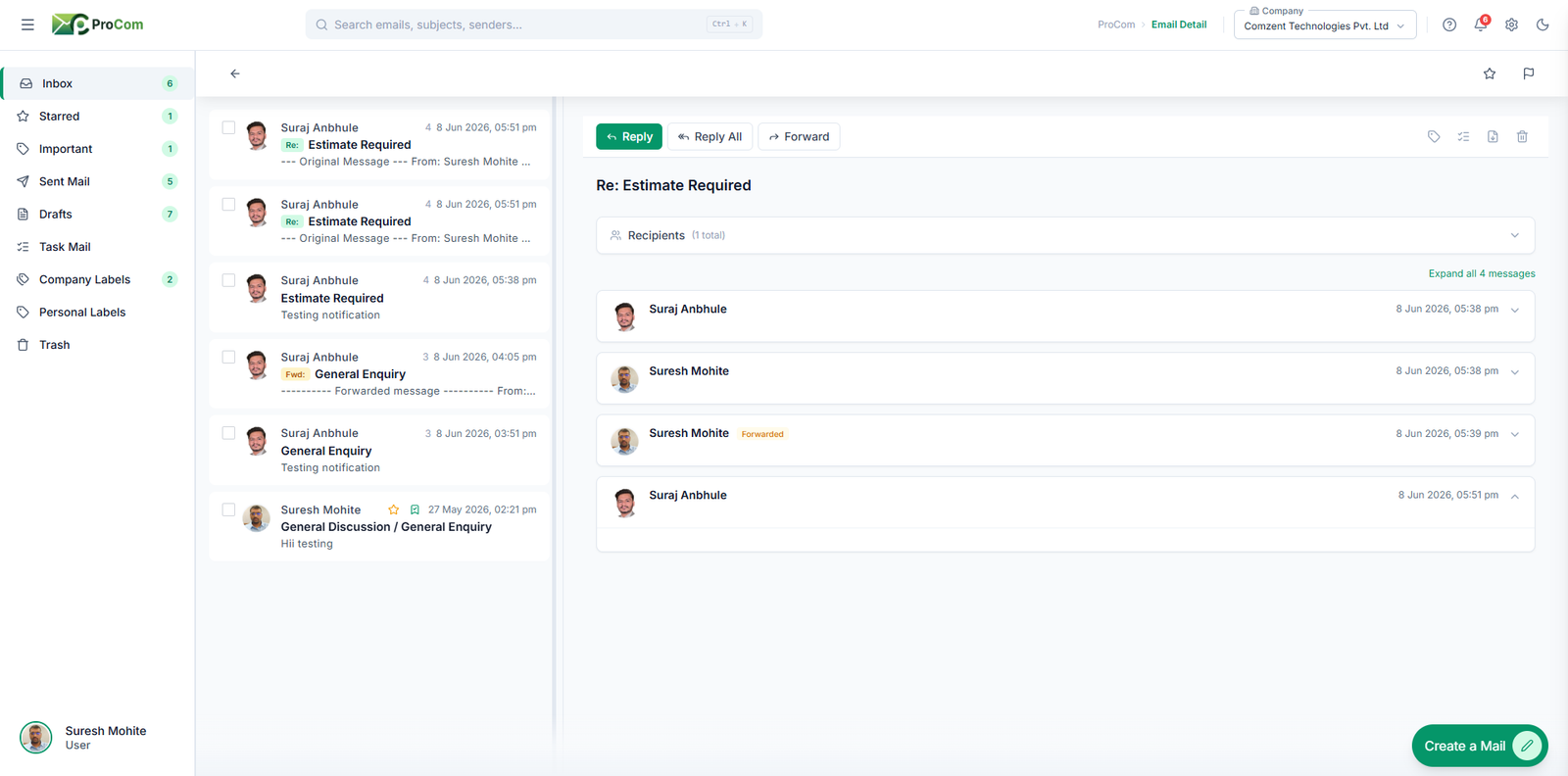
ProCom Main Dashboard
BUSINESS IDENTITY

Your Contacts Come With
Your Business Identity

ProCom is also not an open email platform where anyone can simply create an account and start contacting people.

A person can use ProCom only after being connected with an organization. This keeps the platform focused on professional and business communication.

Your contacts can therefore come from different business relationships within the BcStep network.

01

Inside Your Organization

Employees connected to your organization, branch, department or project can become available for ProCom communication based on your organization's contact and access settings.

02

Project Organizations

When your organization is connected to another organization through a project, relevant contacts from the connected organizations can become available for formal communication, enabling structured coordination within the project environment.

03

Organization-Level Communication

ProCom also allows communication to be directed to an organization rather than only to an individual. This reduces dependency on a particular employee and helps ensure that formal communication remains accessible even when a person is unavailable or leaves the organization.

04

Direct Internal Communication

You can also communicate directly with an employee of your own organization who is not connected to your particular branch, department or project, using their Customer-ID and PIN.

05
EXTERNAL CONNECTIVITY

Direct External Business Communication

ProCom also allows you to communicate with employees of other organizations—even when you are not connected through a project, and even when your organizations belong to different business categories, provided they are registered on BcStep.

You can initiate such a communication using the other person's Customer-ID and PIN.

01

If you no longer wish to continue the communication, simply select Close Communication.

02

The connection will remain closed until you or the other person intentionally reconnects using the required Customer-ID and PIN process.

03

This gives you control over when and for how long you remain connected with an external contact, according to your business requirements.

PIN Privacy

In this form of connectivity, your PIN is never revealed to the person you connect with. Therefore, knowing your Customer-ID alone does not allow your colleagues or people from the other organization to contact you without your permission.

PRIVACY

Privacy Without Losing Professional Connectivity

Founder, Partners, Key Managers and HR/Accounts Heads can choose to keep their personal contacts hidden from the default Contacts view of other employees and connected organizations, providing an additional layer of privacy.

They can still initiate communication with anyone through the appropriate Customer-ID and PIN process.

This allows professionals to remain privately connected while maintaining structured business relationships.

CONTINUOUS COMMUNICATION

One Continuous Communication — Not Endless Email Threads

Keeps the Entire Discussion Together

In conventional email, the same matter can become scattered across multiple replies, forwards and copied threads.

ProCom keeps communication within a continuous communication thread, making the complete discussion easier to follow.

It also provides visual differentiation between:

  • Your communication
  • Communication from your organization
  • New communication since your last viewing
  • Previous communication history
Your communication
Communication from your organization
New communication since your last viewing
Previous communication history

This makes it easier to understand what was said, what changed and where the discussion currently stands.

One Communication. One Continuous Record.

No need to reconstruct a decision from multiple email chains.

SEE WHAT HAS CHANGED — FASTER

See What Has Changed — Faster

ProCom improves readability of long communication histories by visually distinguishing:

Your Communication

Your Organization's Communication

New Updates

Earlier Communication

Organization Active users
Connected even when people change
SMART RECIPIENTS

Communicate With Organizations, Not Just Individuals

One of ProCom's important differences is that communication does not have to depend entirely on an individual's email ID.

ProCom allows communication to be directed to an organization, ensuring that the communication remains accessible even when a particular employee is unavailable or leaves the organization.

Only active users are available for selection, helping keep recipient information current.

The Organization Remains Connected Even When People Change

This reduces the risk of important formal communication being lost because it was addressed only to an individual.


CC & BCC

Continuity Without Forwarding

ProCom makes CC and BCC significantly more useful for ongoing business communication.

Communication
A
Existing Communication Complete communication history
Previous communication New update Latest response
CC Recipient Participation visible
BCC Recipient Participation confidential
When added

A recipient can be added to an existing communication without forwarding the communication as a separate copy.

Receives the complete previous communication
Remains connected to the communication going forward
CC participation remains visible
BCC participation remains confidential
Communication continues as one continuous record

A person who was forgotten initially can also be added later without creating another communication chain.

One Matter. One Communication. One History.
This improves traceability and reduces confusion about which version contains the latest information.
Communication → Execution

Communication That Becomes Action

Don't Just Read the Communication. Act on It.

A ProCom communication can directly become:

Task Reply Follow-up Discussions In-Q Archived

A communication can therefore move directly from formal communication into execution.

01
Received
Communication
02
Task
03
Assigned
Employee
04
Execution
05
Completion

The action labels are visible to relevant colleagues within the organization, allowing teams to see whether someone has already taken responsibility for a communication.

This reduces:

Duplicate actions

Missed communication

Unnecessary forwarding

Manual tracking

And creates clearer ownership and accountability.

Communication → My Diary → Task Manager

ProCom is not isolated from execution.

01Reply
02Follow-up
03Discussions
04In-Q
05Archived
06Task

Similar to ProChat, a received communication in ProCom can be added to My Diary for:

01

Reply

02

Follow-up

03
•••

Discussions

04
?

In-Q

05

Archived

06

Task

or converted into a Task.

The action can be assigned to yourself or another colleague, tracked through the respective Diaries and, where applicable, moved into the BcStep Task Manager.

Assigned to yourself
Another colleague
Respective Diaries
BcStep Task Manager

The original communication remains linked to the action, preserving its context and attachments.

Communication Transforms into Work

This eliminates the need to manually copy information from email into a separate task-management system, reducing duplication and ensuring that the original communication remains connected to the resulting action.

Management Visibility
& Communication Accountability

ProCom can make action taken on received communication visible to relevant colleagues.

If one employee has already marked a communication for

Reply Follow-up Discussions In-Q Task

others can see the relevant action label instead of unknowingly performing the same action again.

This helps management and teams understand:

Who has taken responsibility?
What action has been selected?
Is someone already handling it?
Has the action been completed?

The underlying action system also supports assignment trails, reminders and completion tracking.

Communication That Knows
Its Business Context

ProCom is designed to maintain the relationship between:

Project Communication Document Decision Action
Communication
Project
Document
Decision
Action

Because communication is project-linked, formal correspondence can remain associated with the relevant project rather than becoming isolated inside an employee's inbox.

Each ProCom communication also provides a Chat thread through which participants can discuss matters related to that communication, consult internal or external individuals, seek clarifications or obtain approvals before taking further action.

These discussions remain permanently connected to the ProCom communication, creating a complete record of what was discussed, what was decided, why it was decided and who was consulted or involved. This provides stronger professional transparency and a valuable reference for the future.

This makes historical communication more useful for:

Reviewing decisions
Tracking approvals
Understanding commitments
Finding previous correspondence
Reviewing discussions and consultations
Establishing communication history
One Communication. Its Complete Context. Its Complete History.

This keeps the communication, discussion, decision and resulting action connected rather than scattered across separate emails, chats or personal records.

AI Helps Keep ProCom Communication Professional

ProCom is designed specifically for formal business communication.

Its AI-based controls can identify and restrict non-business social content—such as festival greetings, birthday wishes, Good Morning messages, employee goodbye messages and similar social communications—from being sent as formal communication to multiple recipients through CC.

The objective is not to make communication less human, but to ensure that ProCom remains focused on professional and business matters.

Formal communication should remain focused on business—not social-message clutter.
Organizational Control Over Communication Deletion

Organizational Control
Over Communication Deletion

ProCom's approach to communication deletion is fundamentally different from conventional email systems.

Employees do not independently control the permanent deletion of organizational formal communication.

For communication involving multiple recipients through CC within an organization, any recipient may initiate a deletion request, but deletion can be completed only with approval from the authorized organizational authority, such as a Founder, Partner, Key Manager or HR/Accounts Head.

Where a ProCom communication involves multiple organizations, any recipient may initiate a deletion request, but deleting the communication from each organization's records requires approval from the respective authorized representative of that organization.

Organization
Organization

If an organization does not approve the deletion request, the communication remains available in that organization's records. For complete transparency, all other participating organizations are notified of which organization has not approved the deletion request.

This creates a controlled approach to formal communication deletion while preserving:

Continuity Accountability Institutional Memory
THE PROCOM ADVANTAGE

Project-Linked Communication

ProCom connects formal communication with projects, people, actions and business execution.

01

Project-Linked Communication

Every formal communication stays connected to its project.

02

Structured Subjects

Predefined communication categories make retrieval faster and more accurate.

03

Continuous Communication

Keep the complete discussion together in one communication thread.

04

Organization-Level Communication

Communicate with organizations rather than depending entirely on individual email IDs.

05

Smart CC & BCC

Add participants later without creating duplicate communication chains.

06

Actionable Communication

Turn communication into Tasks, Replies, Follow-ups, Discussions or In-Q.

07

My Diary Integration

Convert communication into trackable personal or assigned actions.

08

Task Manager Integration

Move communication directly into execution and task tracking.

09

Communication Accountability

Know who has taken action on a received communication.

10

Visual Communication Tracking

Quickly identify new updates, your communication and your organization's communication.

11

Business Continuity

Keep communication connected to the organization even when employees change.

12

Connected Business Context

Link formal communication with projects, documents, tasks and execution workflows.

13

AI-Driven Communication Intelligence

Generate insights into communication patterns, responsiveness, project participation and work behaviour to support better workforce management and performance reviews.

Business User
Business User

Ready To Run Your Entire Business From One Platform?

Request A Demo